Programmers move between number systems constantly: decimal for people, binary for bits, and hexadecimal as a compact way to write binary. This guide shows how to convert between all three by hand, using the number 46 as a running example, plus the shortcuts that make it fast.
Positional Number Systems in One Paragraph
In any positional system, each digit is multiplied by the base raised to its position, counting from 0 on the right. Decimal 46 is 4×10¹ + 6×10⁰. Binary uses base 2 and hexadecimal uses base 16, but the rule is identical. Only the base changes.
| System | Base | Digits | 46 is written |
|---|---|---|---|
| Binary | 2 | 0–1 | 101110 |
| Octal | 8 | 0–7 | 56 |
| Decimal | 10 | 0–9 | 46 |
| Hexadecimal | 16 | 0–9, A–F | 2E |
Binary to Decimal
Write the place values (powers of two) above each bit and add the ones that have a 1:
place:  32  16   8   4   2   1
bit:     1   0   1   1   1   0
sum:    32 + 8 + 4 + 2 = 46
Memorising the powers of two up to 2¹⁶ (65,536) makes this very quick: 1, 2, 4, 8, 16, 32, 64, 128, 256, 512, 1024, 2048, 4096, 8192, 16384, 32768, 65536.
Decimal to Binary
Method 1, repeated division by 2. Divide, write down the remainder, and repeat with the quotient. Read the remainders from bottom to top.
46 ÷ 2 = 23  r 0
23 ÷ 2 = 11  r 1
11 ÷ 2 =  5  r 1
 5 ÷ 2 =  2  r 1
 2 ÷ 2 =  1  r 0
 1 ÷ 2 =  0  r 1
reading upward: 101110
Method 2, subtract powers of two. Take the largest power of two that fits, subtract it, and repeat. 46 − 32 = 14, 14 − 8 = 6, 6 − 4 = 2, 2 − 2 = 0. The powers used are 32, 8, 4, and 2, so bits 5, 3, 2, and 1 are set: 101110.
The second method is faster in your head once you know the powers of two.
Binary to Hex and Back
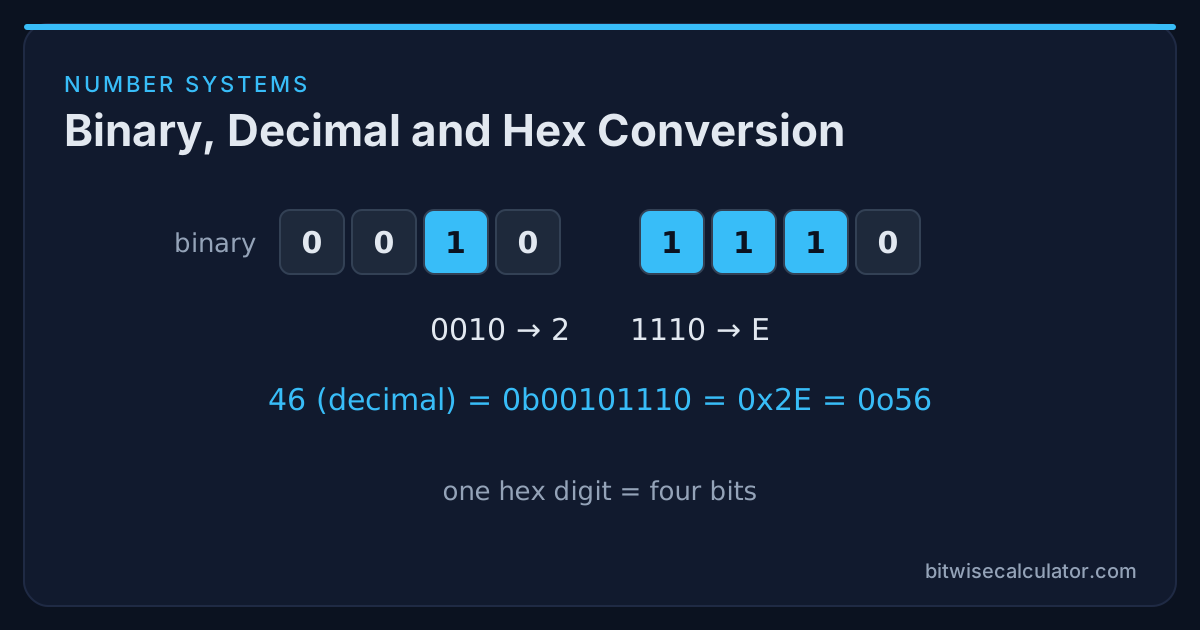
This is the easiest conversion, because one hex digit is exactly four bits. Group the binary number into fours from the right, pad the leftmost group with zeros, and replace each group:
101110 → 0010 1110 → 2 E → 0x2EGoing the other way, expand each hex digit to four bits: 0x4A → 0100 1010.
| Hex | Binary | Hex | Binary |
|---|---|---|---|
| 0 | 0000 | 8 | 1000 |
| 1 | 0001 | 9 | 1001 |
| 2 | 0010 | A | 1010 |
| 3 | 0011 | B | 1011 |
| 4 | 0100 | C | 1100 |
| 5 | 0101 | D | 1101 |
| 6 | 0110 | E | 1110 |
| 7 | 0111 | F | 1111 |
Octal works the same way with groups of three: 101 110 → 5 6 → 0o56. That is why Unix permissions, which come in groups of three bits, use octal. See Unix File Permissions in Binary.
Hex to Decimal and Decimal to Hex
Hex to decimal: multiply each digit by its power of 16. 0x2E = 2×16 + 14 = 46. For a longer example, 0x1F4 = 1×256 + 15×16 + 4 = 500.
Decimal to hex: divide repeatedly by 16 and read the remainders upward, or convert to binary first and then group by four. 500 ÷ 16 = 31 r 4, 31 ÷ 16 = 1 r 15 (F), 1 ÷ 16 = 0 r 1, giving 0x1F4.
Quick Reference: Values Worth Memorising
| Decimal | Binary | Hex | Why it matters |
|---|---|---|---|
| 15 | 1111 | 0xF | one nibble, all ones |
| 127 | 0111 1111 | 0x7F | largest signed byte |
| 128 | 1000 0000 | 0x80 | sign bit of a byte |
| 255 | 1111 1111 | 0xFF | largest unsigned byte |
| 1023 | ten ones | 0x3FF | 10-bit maximum (common ADC range) |
| 65535 | sixteen ones | 0xFFFF | largest unsigned 16-bit |
| 2147483647 | 0 + 31 ones | 0x7FFFFFFF | largest signed 32-bit |
Negative Numbers
All the methods above are for non-negative values. Negative integers are stored in two’s complement, so −46 in 8 bits is 11010010 (0xD2), not −101110. Converting those is covered in Two’s Complement Explained.
Converting in Code
bin(46), oct(46), hex(46)       # ('0b101110', '0o56', '0x2e')
format(46, "08b")               # '00101110'
int("101110", 2), int("2E", 16), int("56", 8) # (46, 46, 46)(46).toString(2); // "101110"
(46).toString(16).toUpperCase(); // "2E"
parseInt("101110", 2); // 46
Number("0x2E"); // 46#include <stdio.h>
#include <stdlib.h>
printf("%X %o\n", 46, 46); /* 2E 56 */
long n = strtol("101110", NULL, 2); /* 46 */Practice
The fastest way to build fluency is to predict an answer and then check it. Type a value into the Bitwise Calculator in one base and read the result in the other two, or use the Bitwise Hex Calculator to see each hex digit expanded into its four bits.