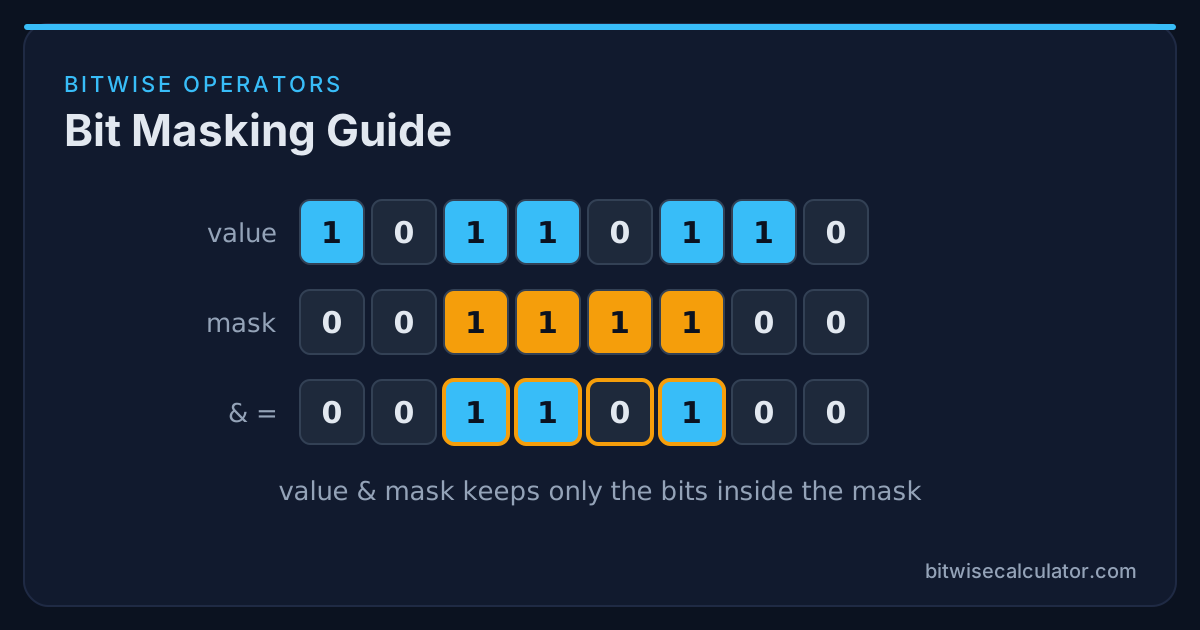
A bit mask is an integer whose 1 bits mark the positions you care about. Combined with the right operator, a mask lets you read, set, clear, or toggle those positions without disturbing the rest of the value. Almost every piece of low-level code, from device drivers to game engines to database engines, relies on these four operations.
This guide walks through each operation, then builds a small permission system that uses all four.
The Four Mask Operations
| Goal | Expression | Operator used |
|---|---|---|
| Read (test) bits | value & MASK | AND |
| Set bits to 1 | value | MASK | OR |
| Clear bits to 0 | value & ~MASK | AND + NOT |
| Toggle bits | value ^ MASK | XOR |
Each row follows from the operator’s truth table. AND with 1 keeps a bit and AND with 0 clears it. OR with 1 sets a bit and OR with 0 keeps it. XOR with 1 flips a bit and XOR with 0 keeps it. In every case, the mask’s 0 bits leave the value alone. That is what makes masks safe to apply.
Building Masks With Shifts
Hard-coding masks such as 0x20 works, but it hides the intent. Building them from a bit position is clearer:
#define BIT(n) (1u << (n))

BIT(0)  /* 0b00000001 = 0x01 */
BIT(5)  /* 0b00100000 = 0x20 */
BIT(7)  /* 0b10000000 = 0x80 */
For a run of bits, use ((1u << width) - 1) << offset. A 3-bit field starting at bit 4 is ((1u << 3) - 1) << 4 = 0b0111_0000 = 0x70. Always use unsigned types in C and C++ for masks. Shifting a 1 into the sign bit of a signed int is undefined behaviour.
Reading Bits With AND
To test one flag, AND with its mask and compare against zero:
if (flags & BIT(3)) { /* bit 3 is set */ }To read a multi-bit field, shift it down and mask it:
unsigned mode = (reg >> 4) & 0x7; /* bits 4..6 */The order matters. Shifting first means the mask is always the small value 0x7, regardless of where the field lives. You can verify any of these with the Bitwise AND Calculator: enter the register value and the mask in hex and read the result.
Setting, Clearing, and Toggling
flags |=  BIT(2);   /* set bit 2    */
flags &= ~BIT(2);   /* clear bit 2  */
flags ^=  BIT(2);   /* toggle bit 2 */
To write a new value into a multi-bit field, clear the field first and then OR in the new bits:
reg = (reg & ~(0x7u << 4)) | ((mode & 0x7u) << 4);Skipping the clear step is one of the most common bugs in register code. Old bits that were 1 stay 1, and the field ends up as a mix of old and new values.
Worked Example: A Permission System
Imagine an app with five permissions stored in one byte:
| Bit | Permission | Mask |
|---|---|---|
| 0 | view | 0x01 |
| 1 | comment | 0x02 |
| 2 | edit | 0x04 |
| 3 | delete | 0x08 |
| 4 | admin | 0x10 |
A user who can view, comment, and edit has the permission value 0x01 | 0x02 | 0x04 = 0x07.
VIEW, COMMENT, EDIT, DELETE, ADMIN = 1, 2, 4, 8, 16

perms = VIEW | COMMENT | EDIT           # 7  (0b00111)
can_edit = bool(perms & EDIT)           # True
perms |= DELETE                         # 15 (0b01111)  grant delete
perms &= ~COMMENT                       # 13 (0b01101)  revoke comment
perms ^= ADMIN                          # 29 (0b11101)  toggle admin

# Does the user have BOTH edit and delete?
needed = EDIT | DELETE
has_all = (perms & needed) == needed    # True

# Does the user have ANY of edit or delete?
has_any = (perms & needed) != 0         # True
The last two checks are worth memorising. (perms & needed) == needed means all required bits are present. (perms & needed) != 0 means at least one is present.
The same logic in JavaScript:
const VIEW = 1, COMMENT = 2, EDIT = 4, DELETE = 8, ADMIN = 16;
let perms = VIEW | COMMENT | EDIT;
perms &= ~COMMENT;
console.log(perms.toString(2).padStart(5, "0")); // "00101"
Storing permissions this way keeps them in a single database column and makes checks extremely fast. The trade-off is that a 32-bit integer only holds 32 flags, and adding a new permission means agreeing on a new bit position. For a deeper look at that trade-off, read Feature Flags With Bitfields.
Debugging Masks
When a mask doesn’t behave as expected, check these in order:
- Print in binary or hex, not decimal.
0b00101101tells you far more than45. - Check precedence. In C-family languages,
flags & MASK == MASKis parsed asflags & (MASK == MASK). Add parentheses. - Check the width.
~0x0Fis0xF0in 8 bits but0xFFFFFFF0in 32 bits. Use the Bitwise NOT Calculator at your type’s width. - Check signedness. In JavaScript, bit 31 makes the result negative. Use
>>> 0to view it unsigned.
Summary
Masks turn one integer into a compact set of switches. Use AND to read and clear, OR to set, XOR to toggle, and NOT to invert a mask. Build masks from bit positions, clear a field before writing it, and print values in binary while debugging. When in doubt, paste the values into the calculator and look at the bit grid.