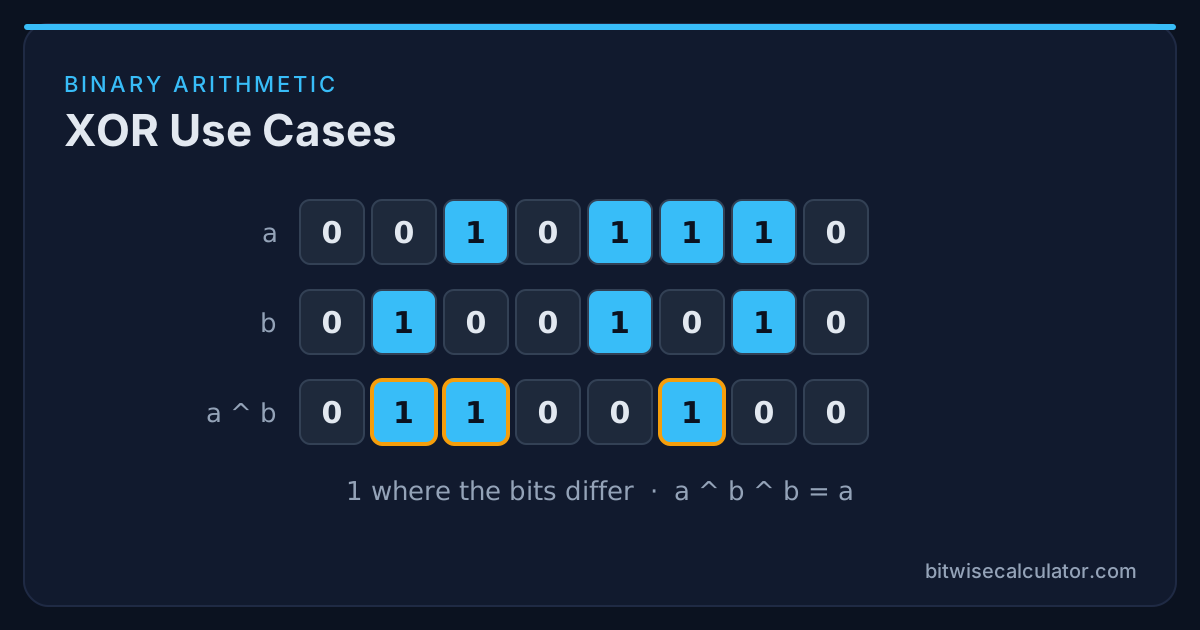
XOR (exclusive OR) returns 1 when two bits differ and 0 when they match. That one rule gives XOR a set of properties no other basic operator has: it is its own inverse (x ^ x = 0), it has an identity (x ^ 0 = x), and it is reversible ((a ^ k) ^ k = a). Those properties show up across computing, often in places you wouldn’t expect.
Here are eight real uses, from everyday code to storage systems.
1. Toggling a Flag
The simplest use is flipping a bit on and off:
#define MUTED (1u << 0)
settings ^= MUTED;   /* press once: muted. press again: unmuted */
Unlike OR (which only sets) or AND-NOT (which only clears), XOR flips the bit whatever its current state. That makes it ideal for toggle buttons and blinking LEDs in embedded code.
2. Checking Whether Two Values Are Equal
a ^ b is zero exactly when a == b. In cryptographic code, this is used to compare secrets in constant time:
def constant_time_equals(a: bytes, b: bytes) -> bool:
    if len(a) != len(b):
        return False
    diff = 0
    for x, y in zip(a, b):
        diff |= x ^ y
    return diff == 0
A normal comparison stops at the first mismatch, so its running time leaks how many leading bytes matched. The XOR loop always processes every byte. Python ships this as hmac.compare_digest, which you should use in real code.
3. Counting Differences: Hamming Distance
The number of 1 bits in a ^ b is the number of positions where a and b differ, known as the Hamming distance.
def hamming(a: int, b: int) -> int:
    return (a ^ b).bit_count()   # Python 3.10+

hamming(0b101110, 0b1001010)     # 3
Error-correcting codes, DNA sequence comparison, and perceptual image hashing (where similar images produce hashes with a small Hamming distance) all depend on this.
4. Parity Bits
XOR all the bits of a value together and you get its parity: 1 if the number of set bits is odd, 0 if even.
int parity(uint8_t x) {
    x ^= x >> 4;
    x ^= x >> 2;
    x ^= x >> 1;
    return x & 1;
}
Serial protocols such as UART can append a parity bit to each byte. If a single bit flips in transit, the receiver’s parity no longer matches and the error is detected.
5. RAID 5 Disk Recovery
RAID 5 extends parity from bits to whole disk blocks. With data blocks D1, D2, and D3, the array stores a parity block P = D1 ^ D2 ^ D3. If the disk holding D2 fails:
D2 = D1 ^ D3 ^ PXOR the survivors and the missing block reappears. This works because every block except D2 appears twice in the expression and cancels out.
6. Simple Checksums
Many file formats and network protocols use an XOR checksum: XOR every byte of the message together and send the result. NMEA 0183 GPS sentences are a well-known example, where the two hex digits after * are the XOR of every character between $ and *.
XOR checksums are fast and catch any single-bit error, but they can’t detect two errors in the same bit position. CRCs are used when stronger detection is needed.
7. Stream Ciphers and the One-Time Pad
Encryption with XOR is symmetric: ciphertext = plaintext ^ key, and plaintext = ciphertext ^ key. Stream ciphers such as ChaCha20 generate a long pseudo-random keystream and XOR it with the data.
A one-time pad, where the key is truly random, as long as the message, and never reused, is provably unbreakable. The moment a key is reused, c1 ^ c2 = p1 ^ p2, and the key cancels out entirely. That is why XOR with a short repeating key is not encryption, only obfuscation.
8. Finding the Unique Element
The interview classic: every number in an array appears twice except one. Find it in a single pass with no extra memory.
const nums = [7, 3, 5, 3, 7];
const unique = nums.reduce((acc, n) => acc ^ n, 0);  // 5
Pairs cancel to zero because x ^ x = 0, leaving only the unpaired value. A related trick finds a missing number in 0..n by XORing all indexes with all values.
Bonus: XOR in Graphics
Early graphics systems drew cursors and selection rectangles by XORing pixels with the screen. Drawing the same shape a second time XOR-ed the pixels back to their original colours, erasing it without saving what was underneath. Modern GPUs have better tools, but you’ll still find XOR drawing modes in some graphics APIs.
Try It Yourself
Use the Bitwise XOR Calculator to experiment. Enter two values and the bit grid highlights every position that differs. Try XORing the result with one of the inputs again and you’ll get the other input back, which is the reversibility property behind every example above.